Conversation Layout
These two parameters control what contact information is displayed in the agent interface: one for the conversation list and one for the header of the open conversation.

Parameters
Conversation list layout
| Key | conversation_list_layout |
| Default value | _NAME - _PHONE_NUMBER |
| Category | Messages |
Defines the text shown below the name in each row of the conversation list. Allows agents to identify the customer at a glance without opening the conversation.
Conversation header layout
| Key | conversation_header_layout |
| Default value | _NAME - _PHONE_NUMBER |
| Category | Messages |
Defines the text shown in the header when an agent opens a conversation. Allows seeing key customer data in context without consulting the PhoneBook separately.
Available variables
Both parameters accept free text combined with the following system variables:
| Variable | Description |
|---|---|
_NAME |
Contact name registered in the PhoneBook. |
_PHONE_NUMBER |
Contact phone number. |
_ATTR.xxxx |
Value of a custom PhoneBook attribute, where xxxx is the key name. |
Separators between variables are free-form: -, |, /, or any fixed text can be used.
Example
With the following configuration:
conversation_header_layout = _NAME - Zone _ATTR.zone - Plan _ATTR.plan
conversation_list_layout   = _NAME - _PHONE_NUMBER
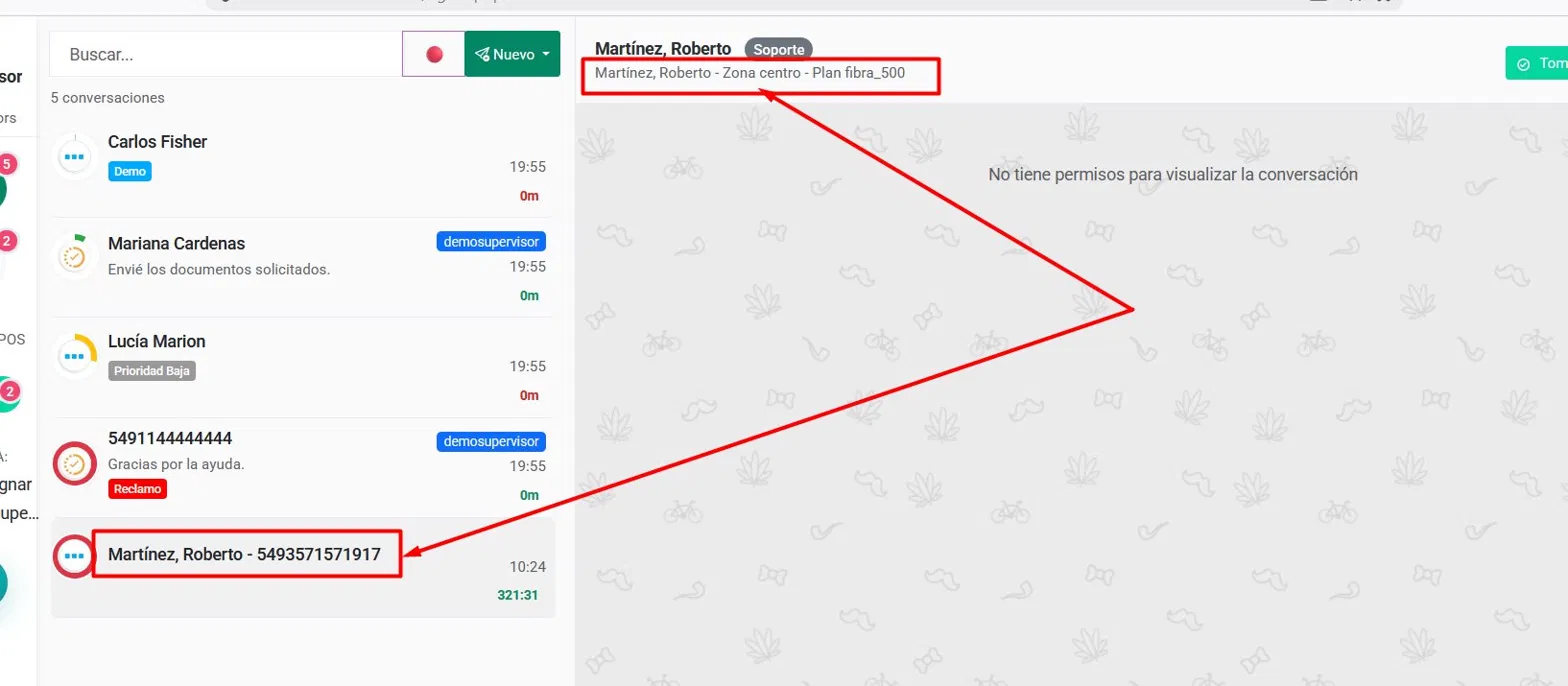
The agent will see:
- In the list:
Martínez, Roberto - 5493571571917 - In the open conversation header:
Martínez, Roberto - Zone centro - Plan fibra_500
Considerations
- If the contact is not registered in the PhoneBook,
_NAMEand_ATTR.xxxxwill be blank; only_PHONE_NUMBERalways has a value. - Configuring the header with business-relevant attributes (zone, plan, segment, etc.) reduces the time agents spend looking up customer data during each interaction.
- The value applies to all conversations in the company; it is not configurable per group or agent.