🔌 Advanced & Beta > External Endpoints
The External Endpoints feature lets you configure HTTP integrations so Kewbot can interact with third-party APIs (CRM, ERP, scoring services, validations, automations, and more).
From this page, you define how Kewbot sends data, reads API responses, and chooses the next step in your flow.
Note: some field names may vary based on version, permissions, and enabled modules.
Typical use cases
- Fetch customer data before routing or replying.
- Register conversation events in external systems.
- Trigger processes outside Kewbot.
- Enrich ITR/conditional logic with external information.
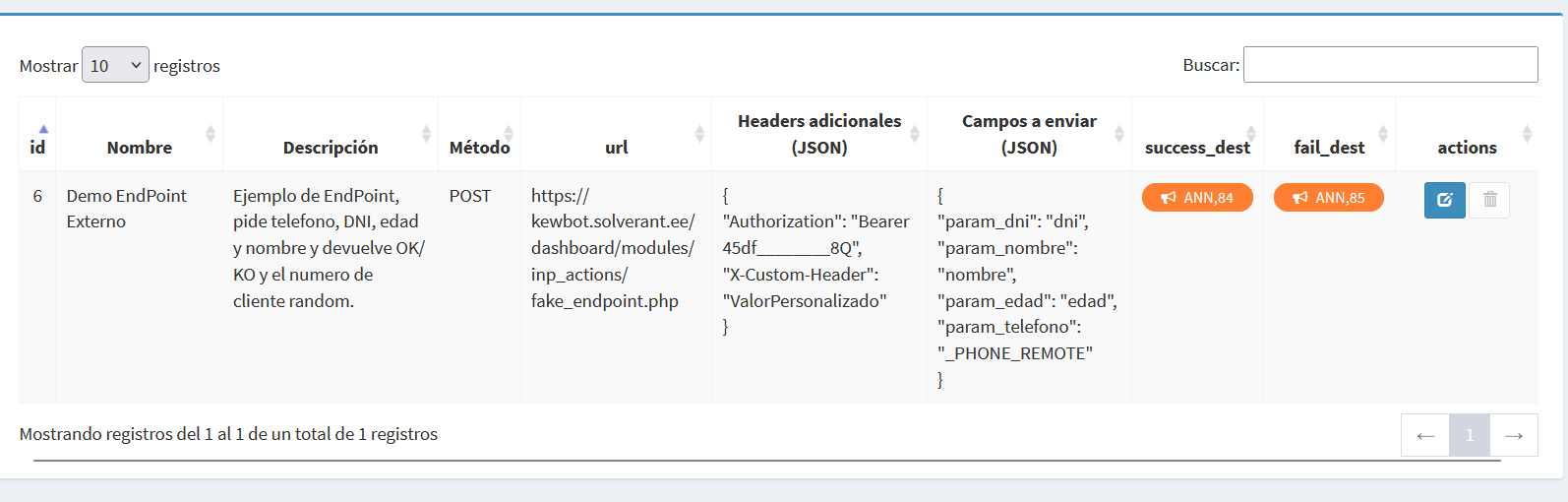
Endpoint list view
| Field / column | What it shows | Why it matters |
|---|---|---|
| Name | Internal endpoint name. | Fast identification across flows. |
| Description | Functional summary. | Understand purpose without opening detail. |
| Status | Active/Inactive. | Operational availability control. |
| Method | GET, POST, PUT, PATCH, DELETE (as configured). | Validate API operation semantics. |
| Target URL | Main destination host/path. | Verify where requests are sent. |
| Last execution | Timestamp of most recent run. | Confirm recent usage. |
| Last result | Success/error from latest attempt. | Early failure detection. |
Create/Edit endpoint form
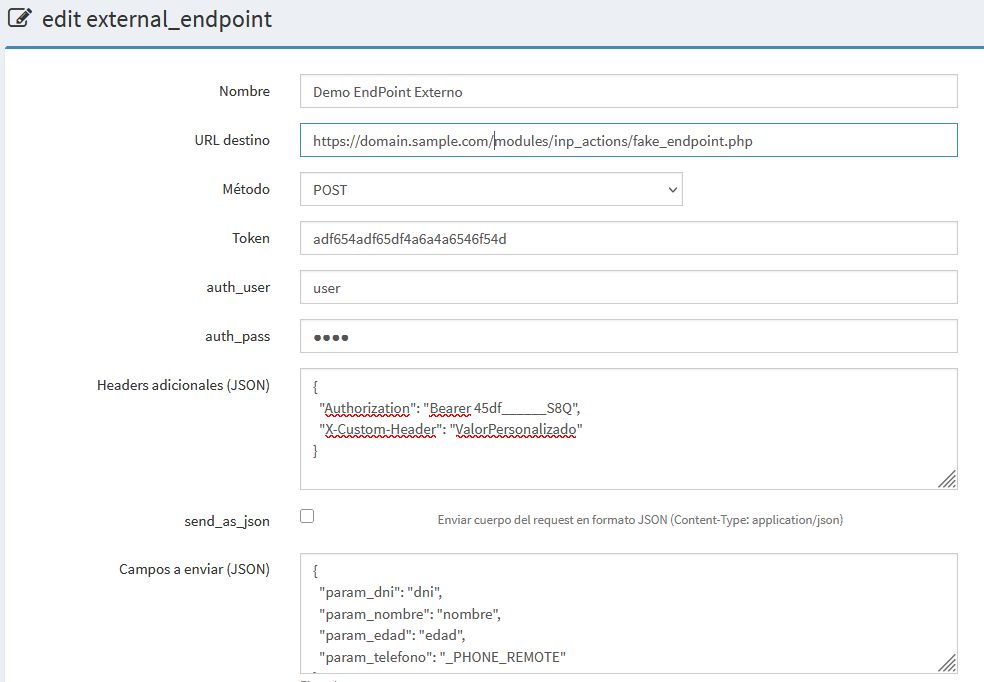
Identity and scope
| Field | Meaning |
|---|---|
| Name | Functional endpoint identifier in Kewbot. |
| Code / internal key | Technical key used in flows/rules. |
| Description | Business/technical purpose of the integration. |
| Active | Enables or disables execution without deleting config. |
Connection settings
| Field | Meaning |
|---|---|
| HTTP method | Operation type used against external API. |
| Base URL | Main domain/server of external service. |
| Path / resource | Specific endpoint route. |
| Query params | URL parameters sent in requests. |
| Timeout (ms/sec) | Maximum wait time before stopping request. |
| Retries | Additional attempts on timeout/error. |
Security and authentication
| Field | Meaning |
|---|---|
| Authentication type | Auth mode (None, API Key, Bearer, Basic, etc.). |
| API Key / Token / Username / Password | Credentials required by chosen auth type. |
| Authorization header | Header name/value used to authenticate calls. |
| Custom headers | Extra key-value headers required by the API. |
Request (outbound payload)
| Field | Meaning |
|---|---|
| Content-Type | Payload format (JSON, form, etc.). |
| Body template | Request payload template sent to endpoint. |
| Available variables | Conversation/contact fields available for injection. |
| Outbound field mapping | Mapping between Kewbot data and API payload structure. |
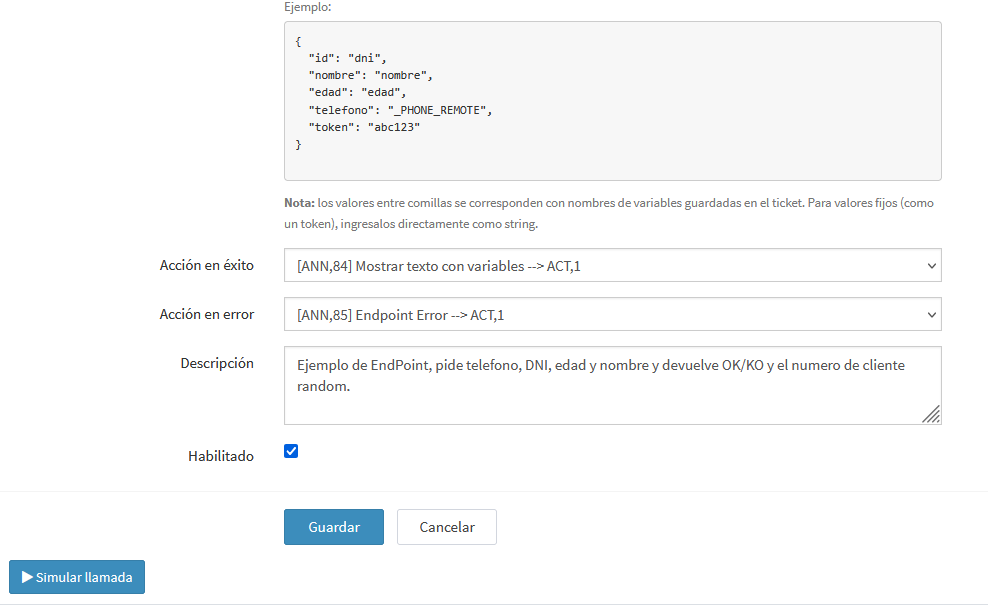
Fields to send and available parameters
The request body is defined in the Fields to send (JSON) field as a JSON object of key-value pairs:
- Key (left): the field name the external API expects to receive.
- Value (right): a parameter that Kewbot replaces at runtime with the matching conversation data, or a fixed value (literal).
{
  "id": "_ATTR.client_id",
  "nombre": "{{nombre_cliente}}",
  "telefono": "_PHONE_REMOTE",
  "opcion_elegida": "_BUTTON_VALUE",
  "orden_trabajo": "_REC.orden_trabajo",
  "token": "abc123"
}
In the example above, "token": "abc123" is a fixed value (sent as-is), while the rest are parameters resolved dynamically.
Parameter types
| Parameter | What it injects | Value example |
|---|---|---|
_PHONE_REMOTE |
The customer's phone number (remote contact) in international format. | "telefono": "_PHONE_REMOTE" |
_BUTTON_VALUE |
The value or payload of the button the customer pressed on the template. | "opcion": "_BUTTON_VALUE" |
{{variable}} |
The value of a variable stored on the ticket during the conversation (e.g. input answers, results from previous steps). | "dni": "{{dni}}" |
_ATTR.attribute_name |
The value of a contact attribute (phonebook). | "cliente": "_ATTR.client_id" |
_REC.attribute_name |
The value of a campaign record attribute, i.e. whatever was sent in the attributes object when the send was triggered via the API (sendTemplate). |
"ot": "_REC.orden_trabajo" |
| (fixed text) | Any other value is sent literally, with no replacement. Useful for tokens, keys, or constants. | "token": "abc123" |
Notes: - If a parameter cannot be resolved (the variable or attribute does not exist), that field is sent with a
nullvalue. - Kewbot automatically adds themessage_alias_idfield to the payload when there is an associated message, so you can correlate the call with the original send. - The Simulate call button lets you test the configuration by manually loading each parameter's value before using it in a real flow.
Response (inbound processing)
| Field | Meaning |
|---|---|
| Expected status code (2xx/...) | Rule used to mark execution as success. |
| Response mapping | Extraction of relevant fields from API response. |
| Save to variable | Persist values for later flow decisions. |
| On error action | Behavior when API returns error/timeout. |
| Error/log message | Stored message/trace for troubleshooting. |
Endpoint testing and validation
Most setups provide a test endpoint action directly in this screen.
| Field / control | Purpose |
|---|---|
| Test data | Simulate variables from a real conversation. |
| Run test | Launch a manual call to validate configuration. |
| HTTP status | Confirm technical result from server. |
| Response body | Inspect returned payload content. |
| Response time | Measure integration latency. |
| Technical log | Diagnose auth, format, or mapping issues. |
Implementation recommendations
- Use secure credentials and rotate them periodically.
- Keep timeout/retry values controlled to avoid blocking flows.
- Version payload/mapping changes and test before rollout.
- Define fallback behavior if external API is unavailable.
- Monitor error logs and success ratio regularly.