⏱️ Time window to reopen conversations
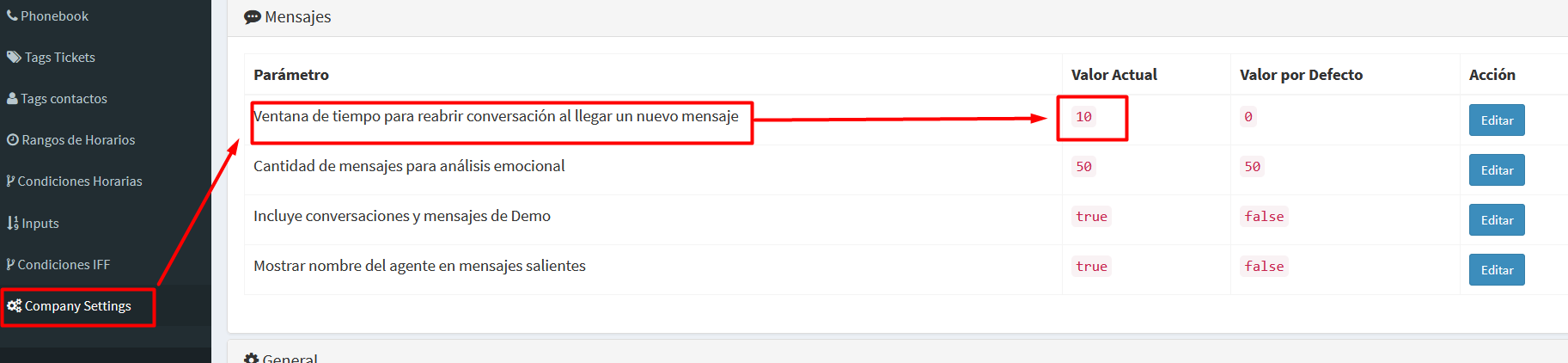
This setting defines how long the system can automatically reopen a closed conversation when a customer sends a new message shortly after the interaction was finished.
What problem does it solve?
In practice, it is very common for a customer to:
- send a thank-you message after the case was closed
- forget to ask one last question
- write something like “sorry, one more thing…” a few minutes later
Without this feature, each new message would be treated as a brand-new conversation, triggering the welcome message or chatbot again, which can be confusing for both the customer and the team.
How does it work?
When this value is greater than 0, the system behaves as follows:
If a customer sends a message within the configured time after the last conversation was closed:
- the conversation is automatically reopened
- it returns to the same support group (e.g., Billing, Technical Support, Sales)
- it is not automatically assigned back to the same agent; it becomes available for the group
If the message arrives after that time window, the system creates a new conversation following the normal flow (welcome message, chatbot, etc.).
Practical example
If the value is set to 10 minutes:
- A customer finishes a conversation at 10:00
- At 10:07 they send a new message
👉 The system reopens the previous conversation and continues the interaction normally
If the customer writes at 10:25
👉 The system starts a new conversation
Recommended value
- 0 → Feature disabled (traditional behavior)
- 5 to 15 minutes → Recommended for most companies
- Higher values → Only for specific use cases
Benefits
- Improves customer experience
- Avoids duplicated conversations
- Reduces manual supervisor work
- Preserves the real interaction context
Note
This feature applies only to conversations handled by a human group/agent.
Conversations closed automatically by flows or chatbots are always treated as new.