WhatsApp Templates
Introduction
WhatsApp templates are pre-approved messages by Meta that allow businesses to initiate conversations outside the 24-hour customer care window or send structured communications (e.g., confirmations, reminders, surveys).
Kewbot connects directly to Meta’s API to sync templates and enable their use in campaigns, agent interactions, and automated flows.
Key Benefits
- Speed: Agents and campaigns can use predefined messages instantly.
- Compliance: Only Meta-approved messages are used, ensuring policy compliance.
- Flexibility: Templates can include dynamic variables, interactive buttons, and multimedia.
- Automation: Buttons can be linked to Kewbot flow destinations.
- Pre-testing: Templates can be tested on your own number before being used in campaigns.
The three ways to send a template
The same template can be sent through three different paths, and each one obtains variable values differently:
| Path | Where variables come from |
|---|---|
| Outbound campaign | Columns of the CSV file loaded into the campaign. |
| Agent | The agent fills in each variable manually before sending. |
| Flow (GOTO) | Taken automatically from the conversation, based on the template configuration. |
In the first two cases a person or a file supplies the data. In a flow there is nobody: the send is automatic, so variables must be configured on the template beforehand. This is covered below, under Parameters for flow sending.
Listing
The main page shows all synced templates:
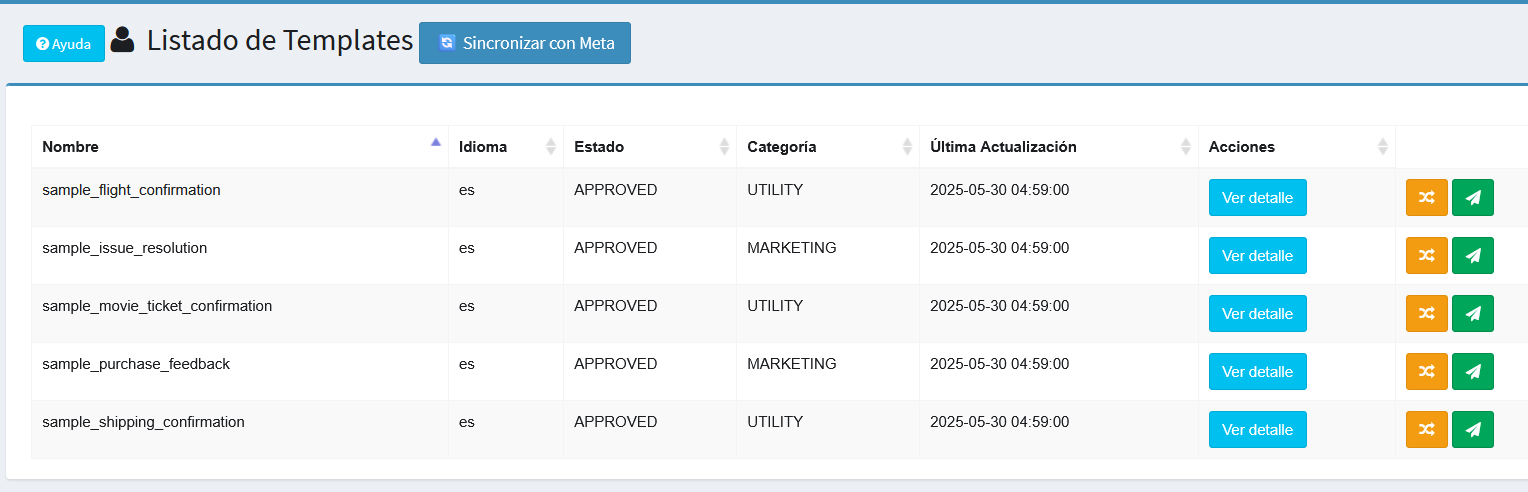
- Name: Template name as defined in Meta.
- Language: Template language.
- Status: APPROVED, REJECTED, or PENDING.
- Category: UTILITY or MARKETING.
- Last update: Timestamp of the last sync with Meta.
- Flow: Indicates whether the template can be used as a flow destination:
- 🟢 No parameters — has no variables, usable as is.
- 🔵 Configured — has variables and they are already configured.
- ⚪ Incomplete — has unconfigured variables. It does not appear as an option when selecting flow destinations.
- Actions:
- 🔎 View details: Shows full template information.
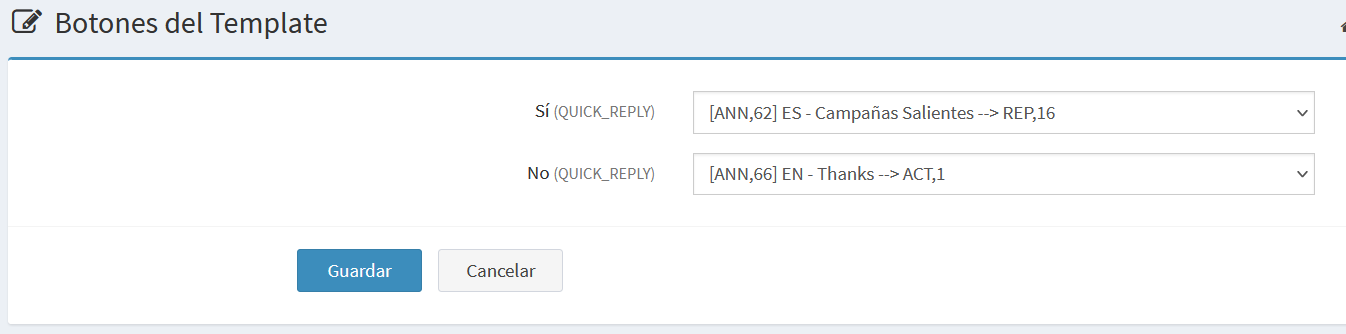
- 🔄 Edit button destinations: Configure buttons (if present) to Kewbot destinations.
- 📤 Send test: Send a test version to a specific number.
👉 After any change in Meta, click Sync with Meta to refresh the list.
Template Detail
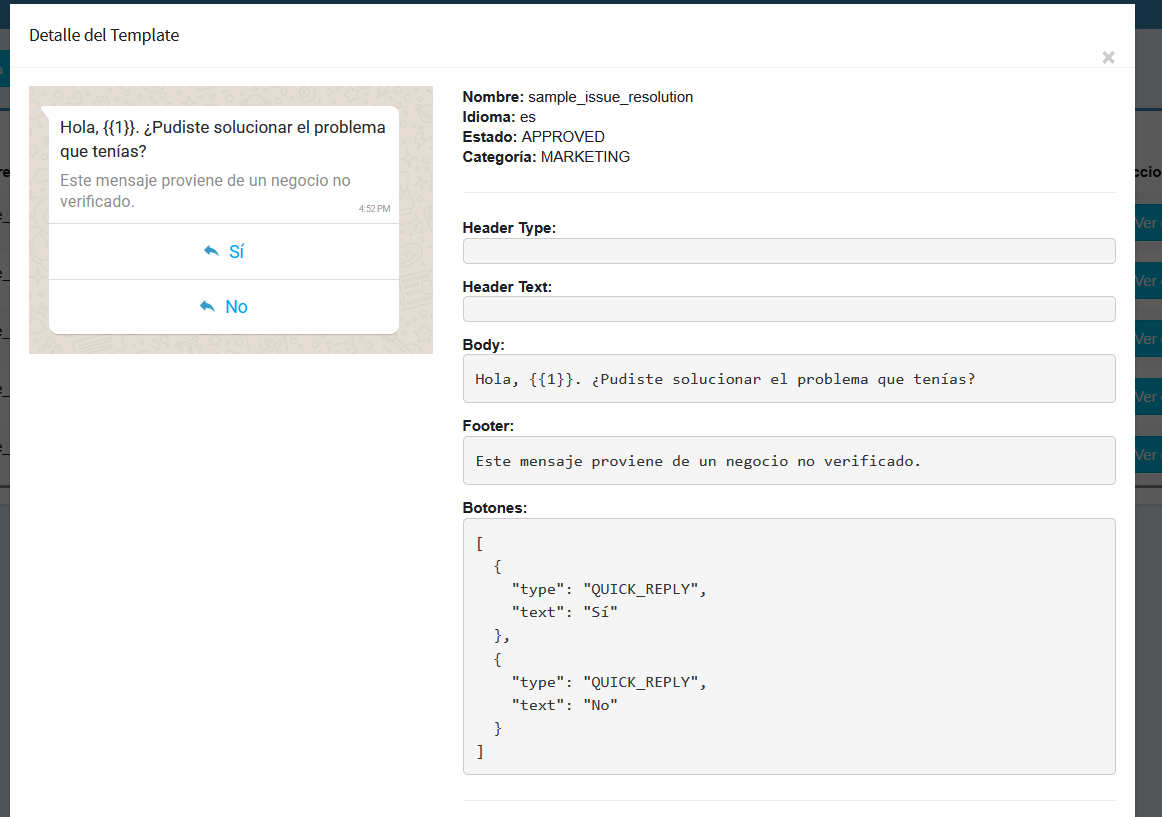
Details include:
- Name
- Language
- Status
- Category
- Header (text/media if present)
- Body (supports variables {{1}}, {{2}})
- Footer
- Buttons (shown in JSON format if present)
- Dynamic preview (exact view of the message as it will appear to the customer).
Template Flow Configuration
This screen defines how the template behaves when used inside a Kewbot flow.
Auto-advance
Determines what happens right after the template is sent:
- No destination (Interactive template): the flow waits for the customer's reply. Timeout and invalid-response controls apply.
- With destination (Informative template): the flow continues automatically to the chosen destination without waiting for a reply. Used when the template only conveys information and the conversation must move on.
Destination if the response does not match buttons
Runs when the customer replies with free text instead of pressing a template button. See Template context for details.
Button destinations
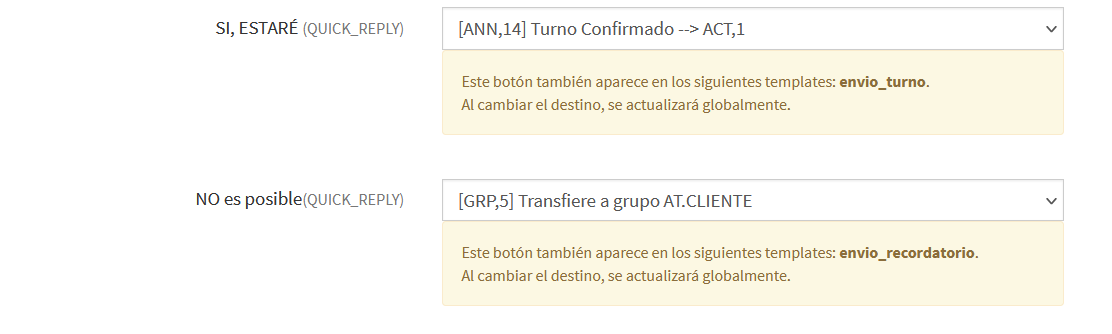
If the template includes quick reply buttons, each one can lead to a different flow destination.
Example:
- Yes → Redirect to an outbound campaign.
- No → Redirect to a thank-you announcement.
This transforms templates into interactive entry points in the conversation flow.
⚠️ Button destinations are shared across all company templates that have a button with the same text. Changing the destination of a "Yes" button affects every template using that same label.
Parameters for Flow Sending
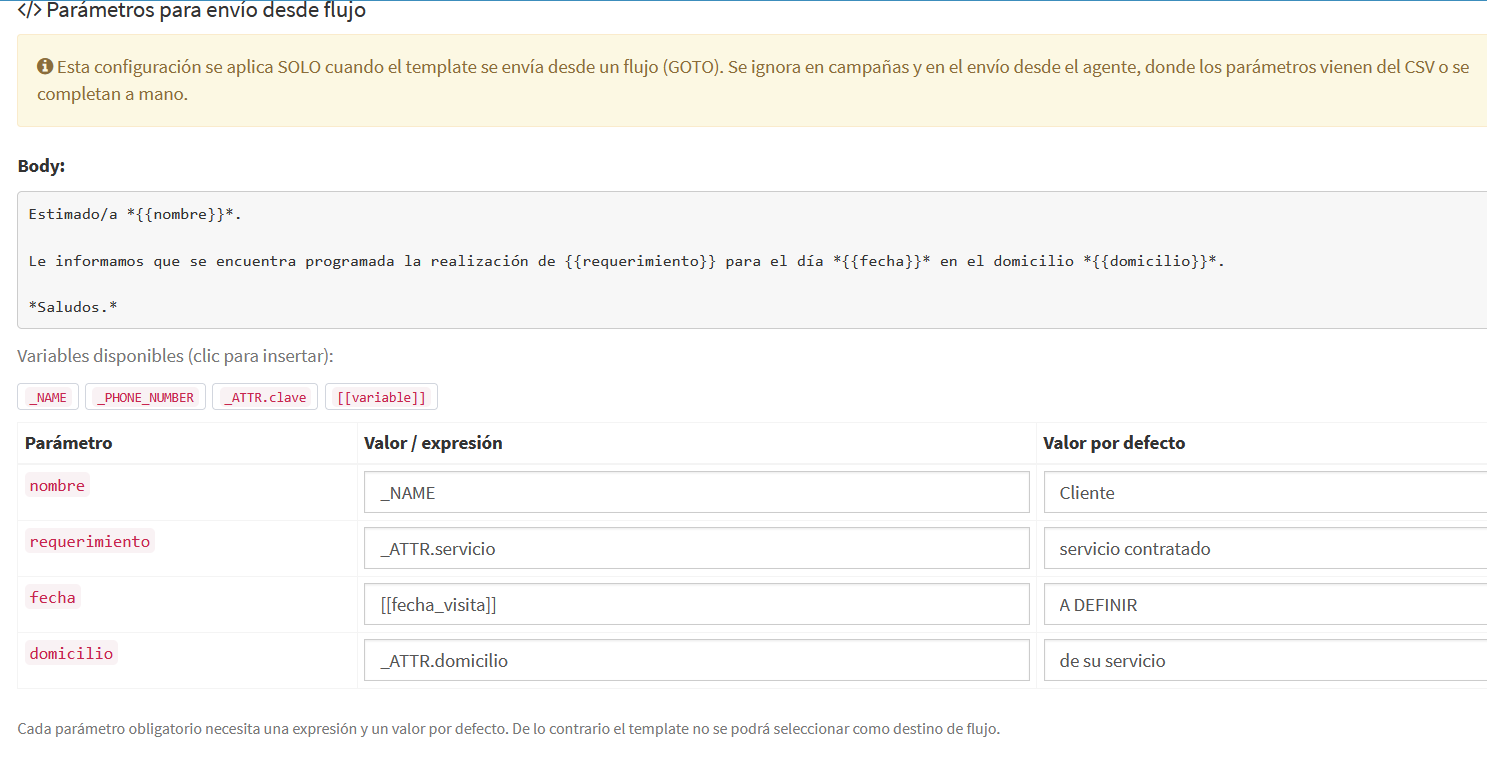
If the template has variables, this section defines where each value comes from when the send is triggered by a flow.
⚠️ This configuration applies only to flow sending. Campaigns still take values from the CSV and agents still fill them in manually. Changing this configuration does not affect either of those paths.
Available variables
| Variable | Description |
|---|---|
_NAME |
Contact name registered in the PhoneBook. |
_PHONE_NUMBER |
Contact phone number. |
_ATTR.xxxx |
Custom PhoneBook attribute, where xxxx is the key name. |
[[variable]] |
Conversation variable, produced by an earlier node in the flow (a data input, an external system lookup, etc.). |
They can be combined with fixed text. For example, Dear _NAME produces Dear Martínez, Roberto.
Default value
Every parameter also requires a default value, used when the variable has no content at send time.
This is required because WhatsApp rejects messages with empty parameters. Without a default, the template would not be sent and the customer would receive nothing.
The default replaces the entire parameter, not just the missing piece. If the expression is
_NAME from _ATTR.companyand the contact has no company attribute, the whole default is sent rather than a half-filled text.
Flow design responsibility
Kewbot cannot verify in advance whether a conversation variable will exist by the time the flow reaches the template. It is the flow designer's responsibility to ensure earlier nodes have produced those variables.
If they do not exist, the message is still sent using the default values.
Buttons with dynamic URL
Some templates have a button whose web address is partially completed on each send. In those cases the screen shows the fixed part of the address, which cannot be edited, and a field for the value appended to it.
⚠️ Only the variable part should be entered. Pasting the full address duplicates the link and breaks it.
Templates with document or video
If the template has a document or video in its header, the file address is also a parameter and must be configured.
The file must be at a publicly accessible address, because WhatsApp needs to download it at send time.
Templates unavailable for flows
A template is marked Incomplete and does not appear as a destination option when:
- it has parameters without configuration, or without a default value;
- it has a variable in the text header (not supported).
Once configured, the status becomes Configured and the template becomes available in the destination selectors across all modules.
Changes made in Meta
If the template is modified in Meta and a new variable is added, syncing with Meta detects the missing configuration and the template automatically returns to Incomplete until the new parameter is filled in.
Test Sending
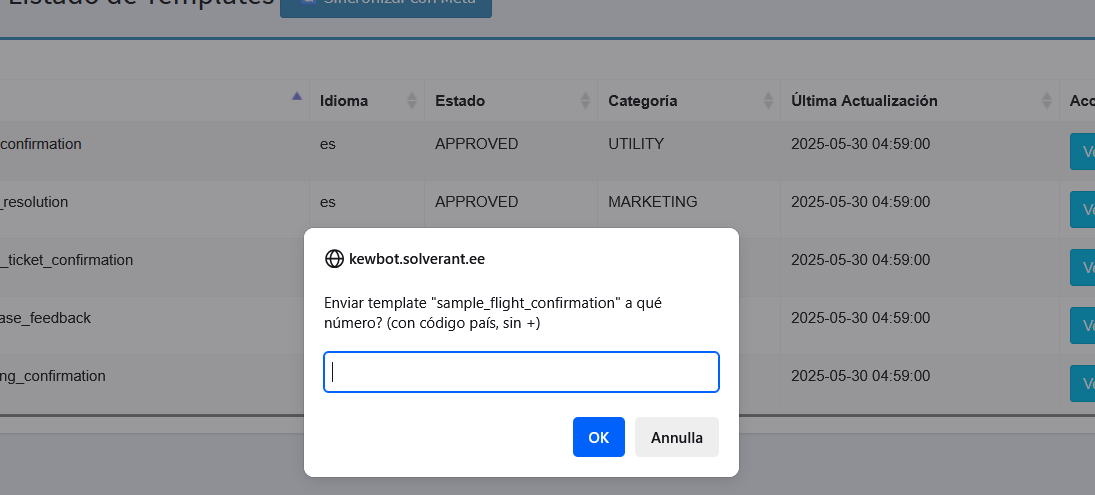
Before production use, you can send a test:
- Clicking Send test opens a pop-up asking for the phone number (with country code, no “+”).
- If successful, the message is delivered to the number exactly as a customer would see it.
This ensures the template looks and works correctly.
Notes and Examples
- Templates must be created and approved in Meta. Kewbot only syncs and makes them usable.
- Always send a test before including templates in campaigns.
- Example:
- Template sample_issue_resolution: asks if the customer solved their problem.
- Button “Yes” → outbound campaigns flow.
- Button “No” → thank-you announcement.
- Flow parameter configuration is ignored in campaigns and in agent sending.
- After modifying a template in Meta, always sync and check that the Flow status is still what you expect.
- Flow usage example:
- Template visit_reminder: reports the date and time of a technical visit.
- Parameter name →
_NAME, default Dear customer. - Parameter date →
[[visit_date]], produced by an earlier external system lookup in the flow.