Intent Detectors (INT)
The Intent Detector (INT) node lets Kewbot understand what the customer writes in their own words and route the conversation to the right flow, without forcing them to pick from a button menu.
Unlike a menu (ITR or REP), where the customer must select a predefined option, the INT detector analyzes a free-text message —for example "I wanted to know if my order hasn't arrived yet"— and classifies it within a closed list of intents configured in advance by the company. It then directs the flow to the destination associated with the detected intent.
It is the piece that turns an open "how can I help you?" into an automatic, orderly handoff.
What is it for?
The INT detector answers questions like:
- Does the customer want to buy, file a complaint, ask about a price, or talk to a person?
- Does this message belong to Sales, Support, or Billing?
- Does what they wrote match any of the topics the company handles, or is it out of scope?
It is useful for automated reception, smart routing to groups, and any point in the flow where the customer expresses themselves freely and the company needs to direct them without a rigid menu.
The INT detector understands and routes internally, but it never generates text toward the customer. The intelligence is used to comprehend and route, not to reply with automatically written messages. Replies remain the ones the company configures in its nodes (ANN, REP, etc.).
Detector list
This view shows all intent detectors configured for the company.
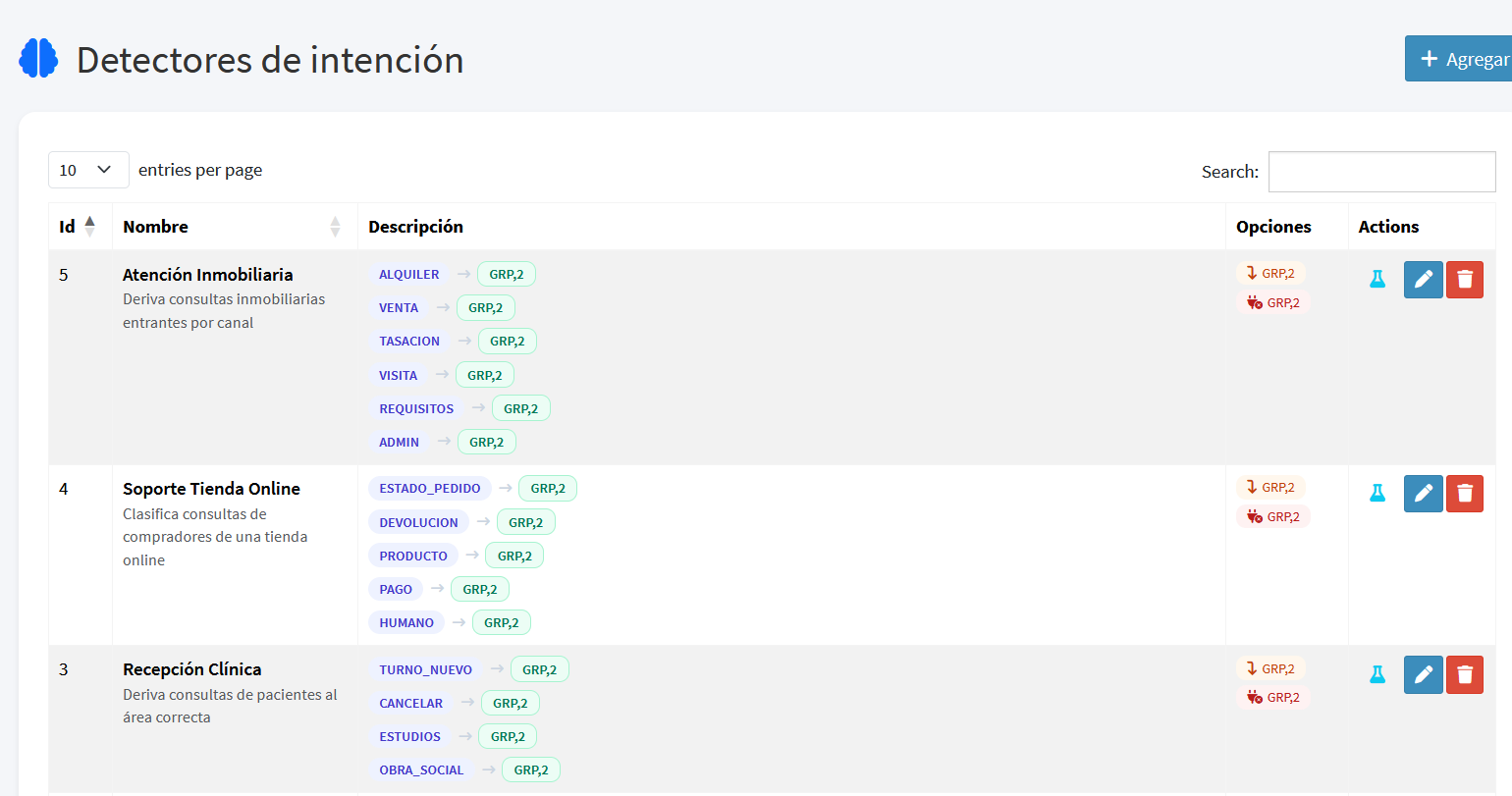
Each row includes:
| Field | Description |
|---|---|
| Id | Internal numeric identifier of the detector. |
| Name | Descriptive name of the detector (e.g. "Online Store Support"). |
| Description | Summary of the detector's purpose. |
| Options | List of configured intents, each with its code and destination. |
| Routes | Special destinations: No Match and Unreachable. |
| Actions | Buttons to test, edit, or delete the detector. |
Add or edit a detector
Click Add (or a row's edit button) to open the detector form.
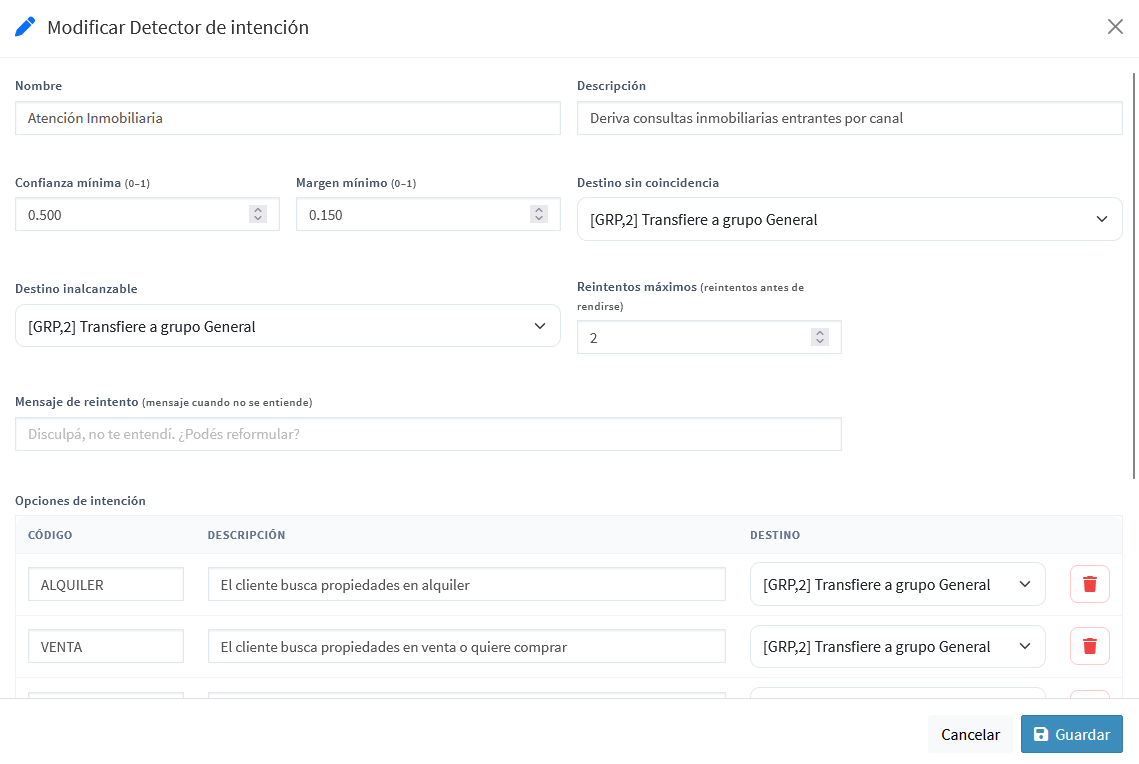
General fields
| Field | Description |
|---|---|
| Name | Identifying name of the detector. |
| Description | Free text describing what this detector is used for. |
| Min Confidence (0–1) | Minimum confidence the winning intent must reach to be accepted. If the best intent falls below this value, it is treated as no match. Default: 0.50. |
| Min Margin (0–1) | Minimum required gap between the 1st and 2nd intents. Prevents deciding when two intents are too close (ambiguous message). Default: 0.15. |
| No Match Destination | Flow the conversation is routed to when, after retries, the message cannot be understood. Typically a group of human agents. |
| Unreachable Destination | Flow routed to when the comprehension engine is unavailable due to a technical issue. |
| Max Retries | Number of times the system asks the customer to rephrase before giving up. Default: 2. |
| Retry Message | Text sent to the customer when the message was not understood, inviting them to rephrase. |
Intent options
Each detector contains a closed list of possible intents. Each option consists of:
| Field | Description |
|---|---|
| Code | Short identifier of the intent, in uppercase (e.g. PRICE, RETURN, HUMAN). Only uppercase letters, numbers, and underscore are allowed. |
| Description | Natural-language explanation of what this intent represents. This description is what the engine uses to decide whether the customer's message matches. The clearer it is, the better the classification. |
| Destination | Flow the conversation is directed to when this intent wins. |
The description of each option is key: the engine compares the customer's message against these descriptions to decide. A vague description produces imprecise classifications; a concrete, customer-oriented description produces good results.
How it works
Unlike a menu, the INT detector works on free text. When it analyzes that text depends on what happened earlier in the flow:
- If no message has been sent to the customer yet at the point the flow reaches the INT node, the detector classifies the message that just arrived. This is the case of an inbound route pointing straight at the INT: the customer writes "I want to know about my invoice" and the conversation is routed immediately, without asking them to repeat themselves.
- If an announcement, a menu, or a template came before the INT, the detector is armed and waits for the customer's next reply. This is the classic behavior and has not changed.
The full path is:
- The flow reaches the INT node. Per the above, it either classifies the message in progress or is armed waiting for the next one.
- When the customer replies, their message is analyzed against the closed list of intents.
- The engine returns a ranking of the best-fitting intents, each with a confidence level.
- The routing decision is applied:
- Valid match: the winning intent exceeds both the minimum confidence and the minimum margin, and the flow continues to that intent's destination.
- No match, ambiguous, or low confidence: the message could not be understood with certainty, the retry message is sent, and the system waits again, until max retries are exhausted.
- Retries exhausted: after insisting without success, the flow continues to the No Match Destination.
- Engine unreachable: on a technical availability issue, the flow continues to the Unreachable Destination, without retrying.
Confidence and margin: how the decision is made
The detector uses two combined thresholds for robust decisions:
- Min Confidence: how certain the winning intent must be. An intent with very low confidence is discarded even if it ranks first.
- Min Margin: how separated the 1st intent must be from the 2nd. If two intents are nearly tied, the message is considered ambiguous and no decision is forced.
Example: for the message "what time do you close and how much do you charge?", the detector might return HOURS and PRICE with very similar values. Since the margin between them is small, the system does not guess: it asks to rephrase or, once retries are exhausted, routes to an agent. This behavior avoids sending the customer to the wrong place.
Simulator
Each detector includes a simulator (test button in the list) that lets you check how a message is classified without affecting real conversations.
Type a sample message and press Test:
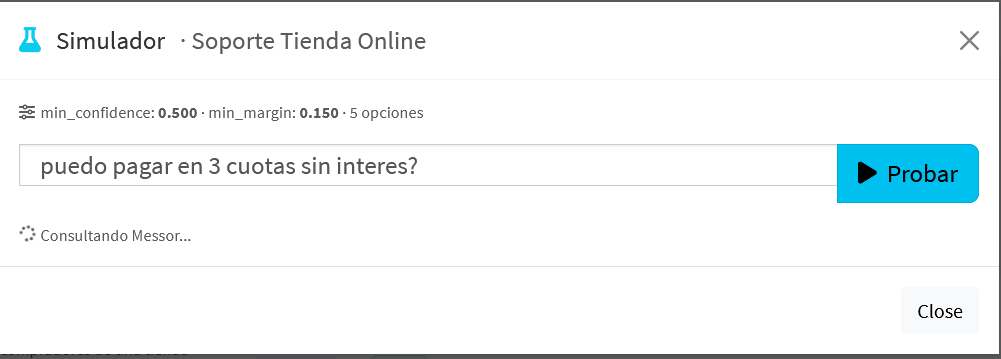
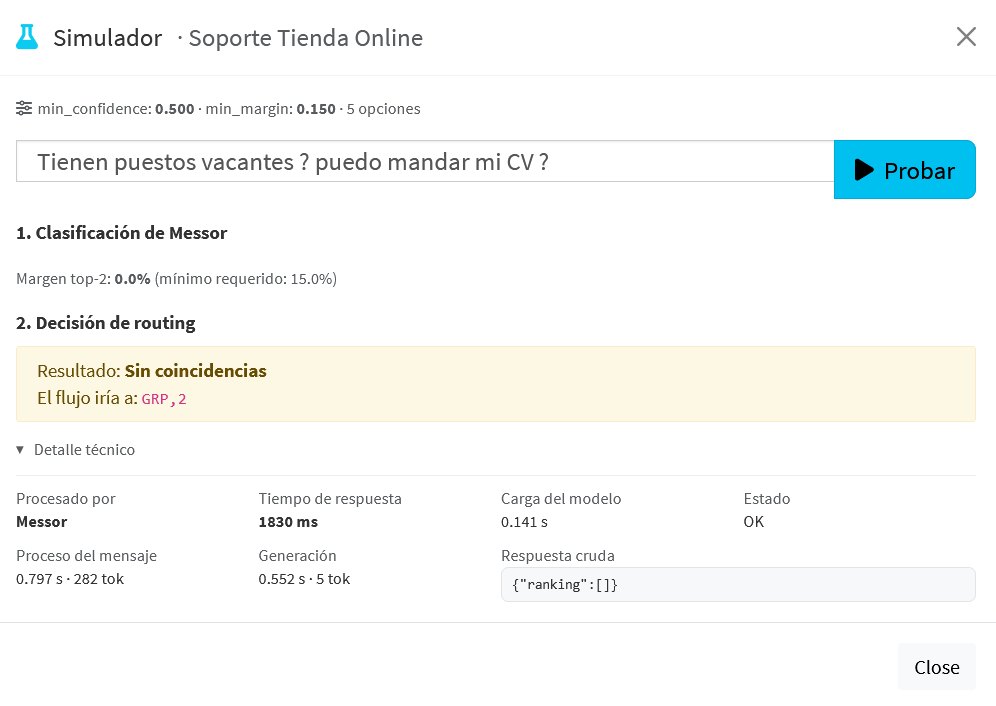
The result is shown in two blocks:
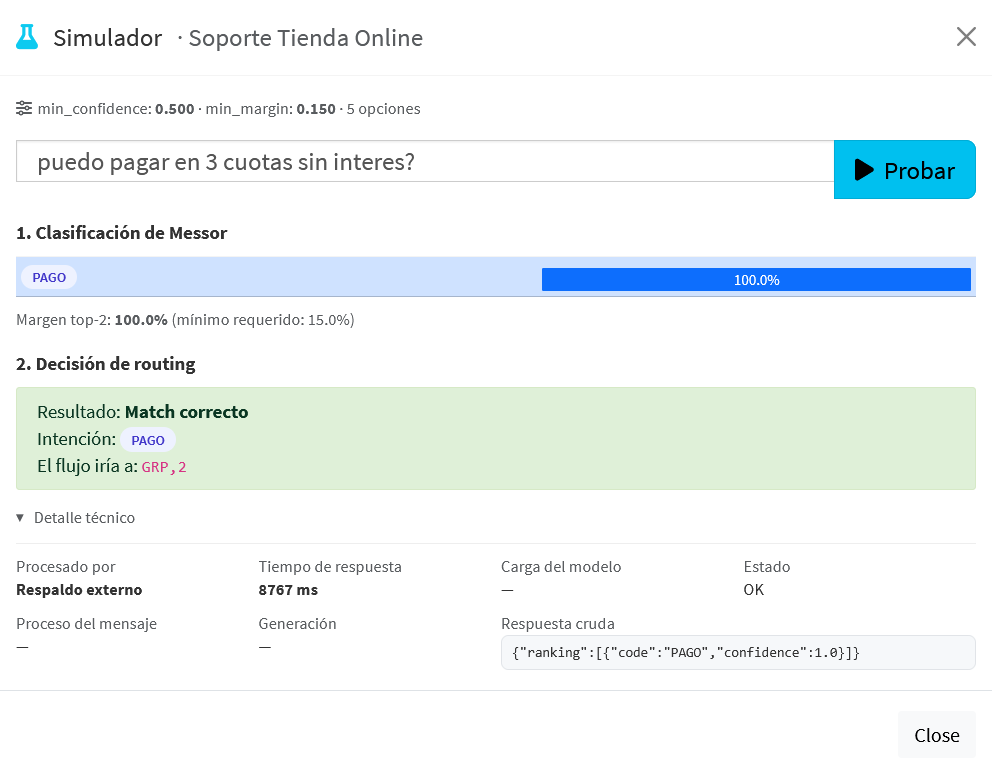
- Classification: the intent ranking with its confidence percentage and the margin between the top two.
- Routing decision: the final outcome, indicating whether there was a match, which intent it was, and which destination the flow would take.
When the message does not match any intent in the catalog, the simulator reflects it as no match, showing that the system correctly recognizes an off-topic message instead of forcing a classification:
Technical detail
Below the decision, a collapsible technical detail panel shows diagnostic information: the component that processed the query, the response time, and the raw response. This is verification and support information; the end customer never sees it.
Recommended pattern: detector directly on the inbound route
Placing the INT as the direct destination of the inbound route lets you serve, in a single step, the customer who already writes what they need. To also cover someone who only says hello, add one more intent to the same detector:
| Field | Value |
|---|---|
| Code | GREETING |
| Description | The customer only greets or opens the conversation without saying what they need. |
| Destination | An announcement along the lines of "How can we help you?", whose destination is this same detector. |
With that single option the detector covers both possible entries:
- "I want to know about my invoice" classifies and routes straight to Billing.
- "Hi" classifies as GREETING, the announcement goes out asking, and the detector is armed to classify the reply.
The announcement is sent only once: on returning to the detector a message has already been sent, so the detector waits instead of classifying again.
Best practices
- If the INT sits behind an announcement, word it so it invites the customer to write, for example "Tell me how I can help you".
- If the INT sits directly behind the inbound route, add a greeting intent (see above). Without it, anyone writing just "hi" will get the retry message.
- Word the retry message so it also works as the first message of a conversation. "Sorry, I didn't quite catch that. Can you tell me what you need help with?" works in both contexts; "Can you explain it another way?" reads oddly as the first thing a customer sees.
- Write concrete option descriptions. The engine decides by comparing the message against the descriptions. "The customer asks about prices, costs, or quotes" works better than "prices".
- Include a human-escape intent, for example HUMAN, when the business calls for it, so the customer can always request an agent.
- Always configure the No Match Destination toward a group of agents: it is the safety net when the message falls out of scope.
- Use the simulator before putting the detector into production, testing both expected messages and off-topic ones.