❗ Invalid Input Management in Menus (ITR / Reply)
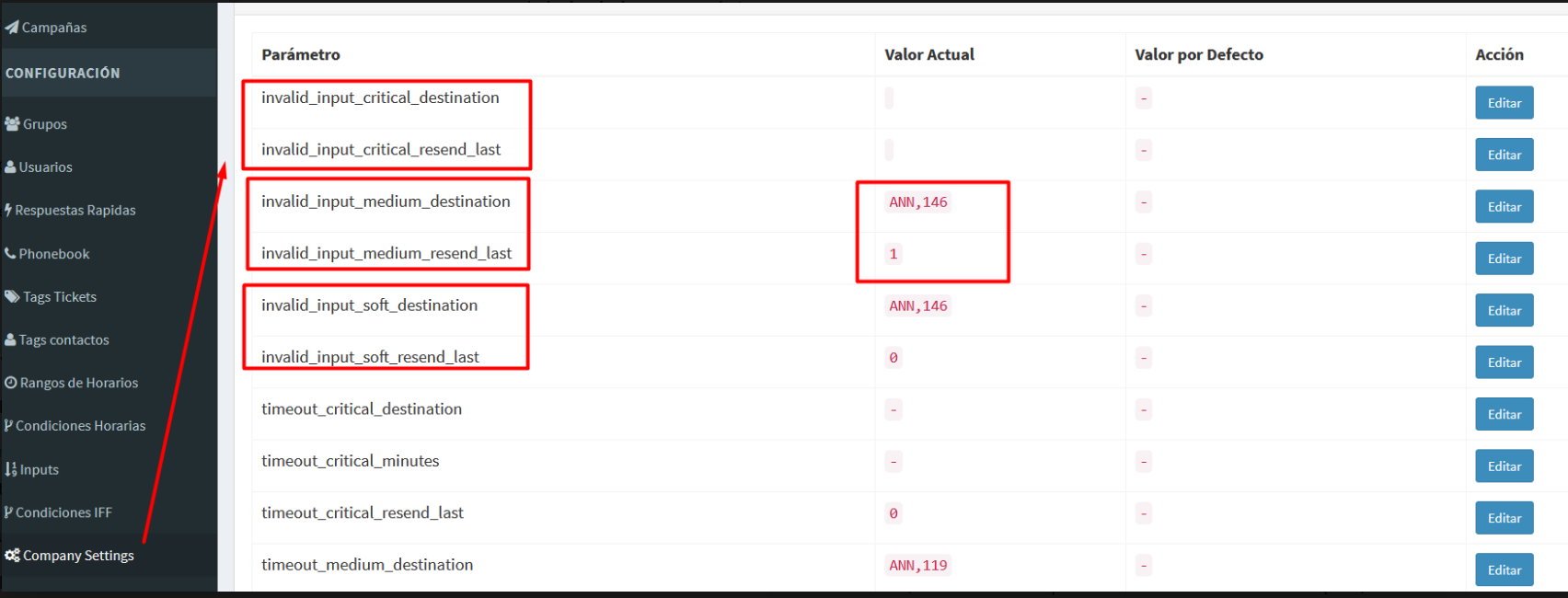
This set of parameters defines how the system should behave when a customer does not respond correctly to an interactive menu sent by the company (ITR or Reply).
What problem does it solve?
When a company sends an interactive menu, for example:
“Please select an option”
It is common that the customer:
- writes free text instead of pressing a button
- sends an audio, image, or sticker
- replies with something unrelated to the displayed menu
If this function is not configured, the system would simply continue the conversation as a normal message or might not react appropriately to the given context.
With this configuration, Kewbot automatically detects that the response does not match the active menu and executes a predefined action.
How does it work?
When an interactive message (ITR or Reply) is sent:
- the conversation is marked as “waiting for response”
- if the customer selects a valid option → the flow continues normally
- if the customer replies with free text or another type of message → invalid input management is triggered
Each time the customer replies incorrectly again, the system automatically increases the management level.
The maximum level is 3.
Management Levels
The company can configure up to three progressive levels for invalid responses:
Level 1 – Soft
First incorrect attempt by the customer.
Level 2 – Medium
Second incorrect attempt.
Level 3 – Critical
Third incorrect attempt (maximum level).
For each level, you can define:
- A destination to execute (for example:
ANN,118,GRP,2,ITR,5) - Whether the last menu should be resent before executing the destination
This allows a gradual strategy: first remind, then warn, and finally redirect.
Automatic Menu Resend
Optionally, the system can:
- remember which menu is currently active
- resend the last interactive message
- then execute the configured action
This helps guide the customer again without breaking the original flow.
When is the waiting state cleared?
The conversation stops being “waiting for response” when:
- the customer selects a valid option
- the ticket is transferred to a group
- an agent takes the conversation
- the ticket is closed
This prevents the validation from remaining active in manually managed conversations.
Destination Validation
To avoid configuration errors, the system only accepts destinations in the following format:
XXX,NN
Where:
XXX= Destination type (ANN, ITR, GRP, REP, etc.)NN= Numeric ID
Valid examples:
ANN,34ITR,2GRP,5
If the format is incorrect, the action will not be executed.
Configuration Parameters
In Company Settings, the following parameters must be configured:
Soft Level
-
invalid_input_soft_destination
Defines the destination executed on the first invalid attempt. -
invalid_input_soft_resend_last 1→ Resend the last menu before executing the destination0→ Execute the destination directly
Medium Level
-
invalid_input_medium_destination
Defines the destination executed on the second invalid attempt. -
invalid_input_medium_resend_last 1→ Resend the last menu before executing the destination0→ Execute the destination directly
Critical Level
-
invalid_input_critical_destination
Defines the destination executed on the third invalid attempt. -
invalid_input_critical_resend_last 1→ Resend the last menu before executing the destination0→ Execute the destination directly
Practical Example
Configuration:
- Soft → Resend menu
- Medium → Resend menu + warning announcement
- Critical → Transfer to Support group (
GRP,2)
Flow:
- Customer replies incorrectly → the menu is resent
- Customer replies incorrectly again → the menu is resent with a warning
- Customer insists → the system automatically transfers the ticket to Support
Benefits
- Improves customer experience
- Reduces misrouted conversations
- Keeps automated flows structured
- Prevents out-of-context messages from reaching agents unnecessarily
- Allows progressive enforcement according to the company’s strategy
Note
This functionality applies only when there is an active interactive menu waiting for a response.
If the conversation is taken by an agent or transferred, the validation is automatically disabled.